
THE PRODUCT
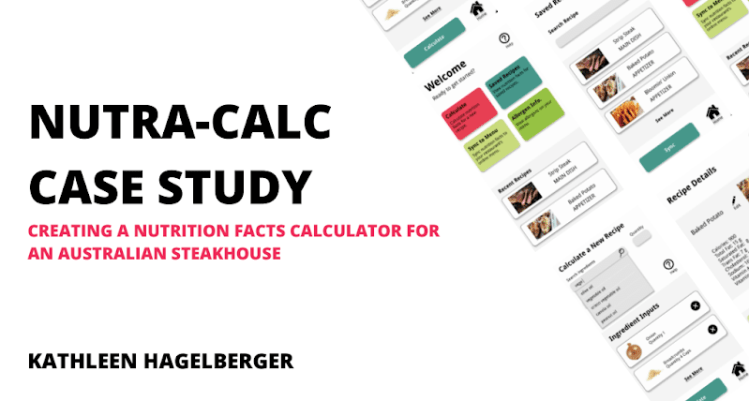
NUTRA-CALC is a nutrition calculator app designed for restaurants to calculate and save the nutrition value of dishes on their menu.
PROJECT DURATION
November 2021 – March 2022 (5 months)
THE PROBLEM
Restaurant patrons want to know nutrition and allergen information for the foods they’re eating, but calculating the nutrition value of a recipe with just a calculator takes too much time for busy chefs. It also can’t easily be scaled or adjusted for ingredient substitutes.
THE GOAL
Develop an app that will calculate the nutrition value of a recipe, with the ability to save the information, scale it, and upload it to an online restaurant menu.
TARGET AUDIENCE
Head chefs, restaurant owners, and other restaurant employees responsible for setting the menu. Restaurant patrons who want to know allergen information or the nutrition value of dishes on the menu would be a secondary audience.
MY ROLE
As a student, I acted as both the Lead UX Designer and Researcher for this project
RESPONSIBILITIES
- User & Competitive Research
- Wireframing
- User Testing
- Low & High Fidelity Prototyping
UNDERSTANDING THE USER
- USER RESEARCH
- PERSONAS
- PROBLEM STATEMENTS
- USER JOURNEY MAPS
USER RESEARCH
User and competitive research was conducted to better understand why restaurants would want to calculate the nutrition value of their recipes, and how head chefs and other restaurant employees use that nutrition information.
I assumed that valuable nutrition information would be limited to calories, fat, and allergens but through the course of conducting research I learned that information like net price, scalability, and the ability to save nutrition information were also important.
I collected secondary research from direct and indirect competitors like Nutritionix, MenuCalc, MyFitnessPal, and MyNetDiary, as well as primary research in the form of user interviews. In total, five participants (two males, three females between the ages of 23 – 55) were interviewed. Three had experience working in the restaurant industry.
If I were to do the primary research again, I would conduct interviews with users who worked in Australian steakhouse restaurants specifically. I would also interview at least one user with accessibility requirements to gain their perspective.
PAIN POINTS

PERSONA & PROBLEM STATEMENT
Darren is a busy head chef at a popular Australian steakhouse who needs a quick and efficient way to calculate the nutrition value of his recipes since calculating health metrics like calories manually takes too long.

USER JOURNEY MAP
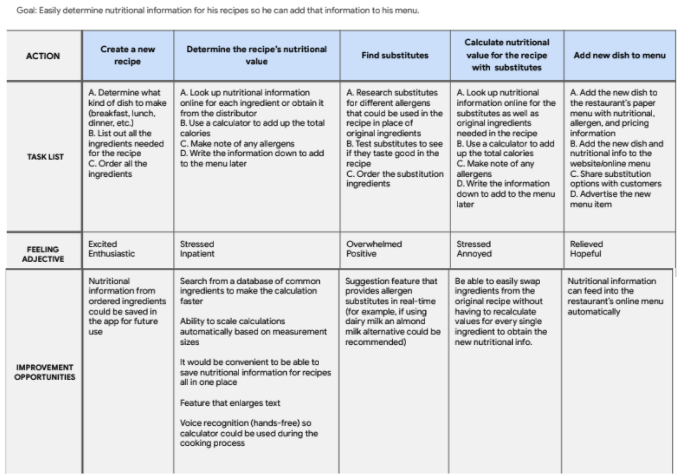
This user journey map was created for Darren’s persona.
Outlining tasks, as well as the user’s feelings during the process made it easier to identify improvement opportunities that could be incorporated into the app’s design.
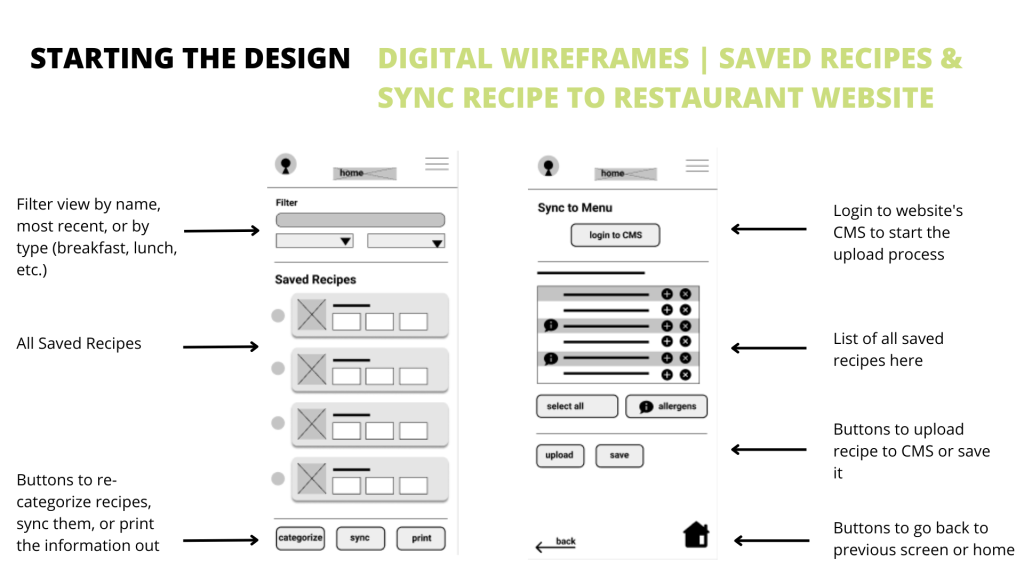
From this user journey map, the ability to save nutrition information, search for common ingredients from a dropdown, and sync nutrition info. with a restaurant’s menu were incorporated into the design.
STARTING THE DESIGN
- PAPER WIREFRAMES
- DIGITAL WIREFRAMES
- LOW-FIDELITY PROTOTYPES
- USABILITY STUDIES
PAPER WIREFRAMES
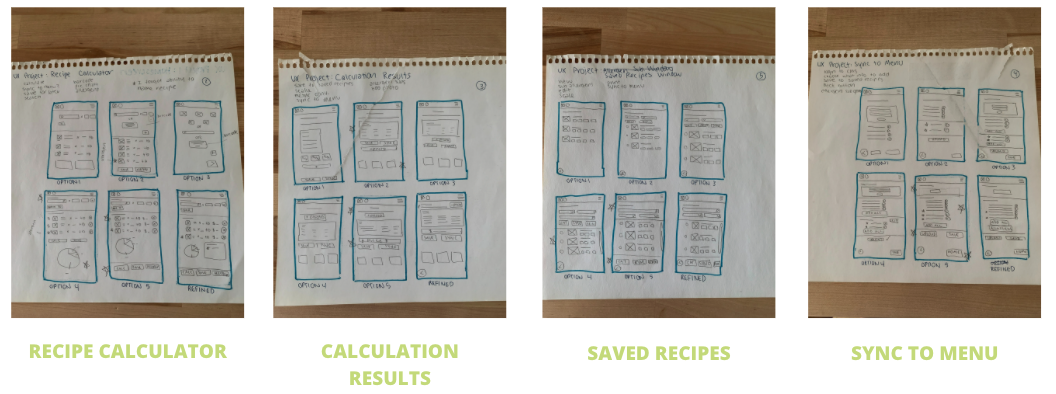
To start, I wanted to outline the home screen to ensure that all the primary features I wanted to include in the app were available from that screen.
These included:
- Nutrition Calculator
- Saved Recipes
- Allergens
- Sync to Menu ability (to sync nutrition info. to restaurant website)
The Refined version of the home screen had four easily accessible buttons for each primary feature, as well as the ability to scroll through recently saved recipes.
I also created paper wireframes for each of the primary app features:
DIGITAL WIREFRAMES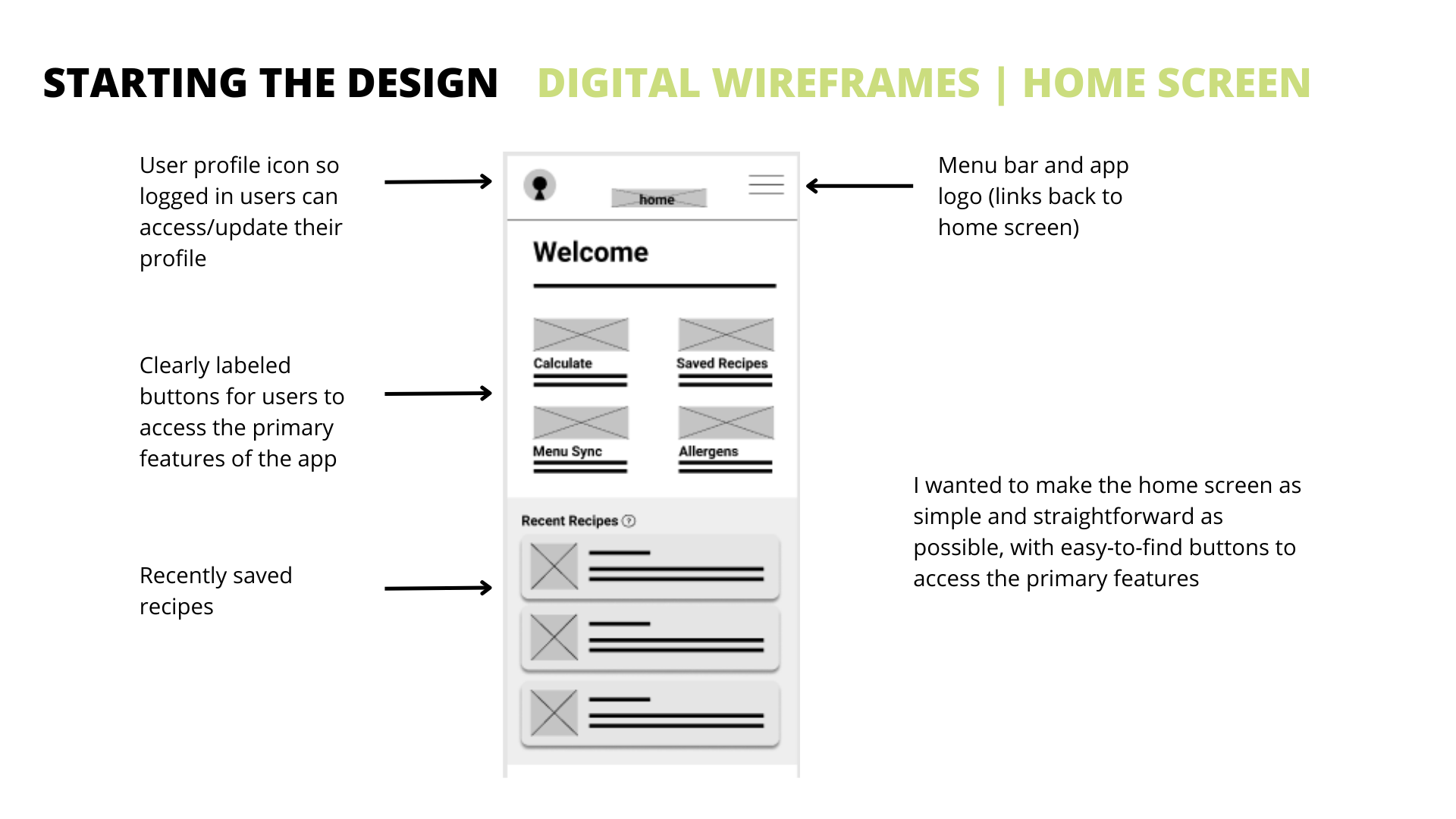


LOW-FIDELITY PROTOTYPE
Main User Flow: Calculate the nutrition value of a recipe and get to the results screen.
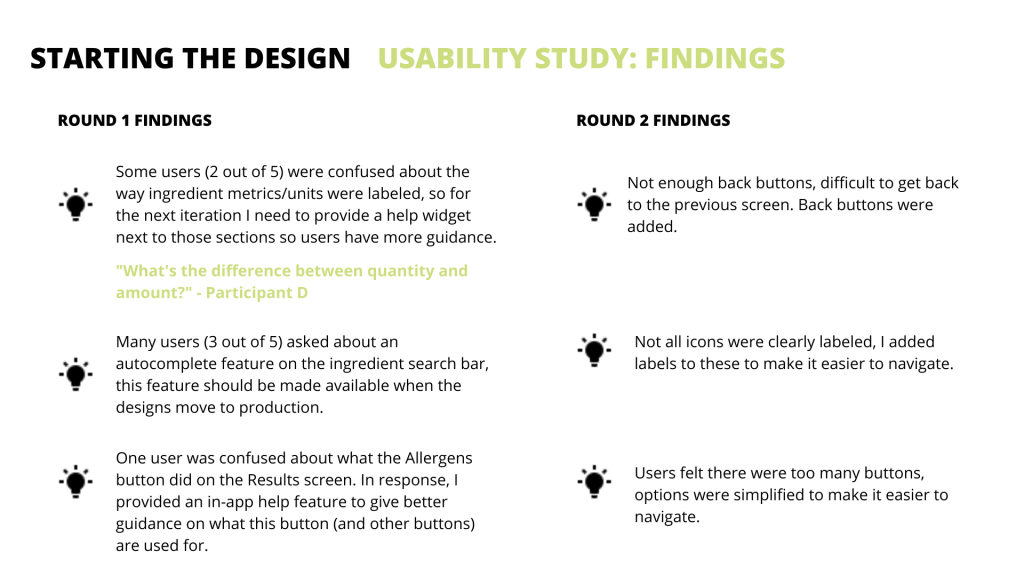
USABILITY STUDY: PROCESS
- Conducted a moderated usability study remotely with participants from the United States
- 5 participants, 2 females and 3 males between the ages of 22 and 55
- Users were asked to calculate a fictional recipe on the low-fidelity prototype
Research Questions:
- Is there any area of the nutrition calculation process where users get stuck?
- Are there any design changes we can make to improve the calculation process?
- Are there any features missing that users wanted to see?
- Does this app save time for users who need to calculate nutrition facts for their restaurant menus?
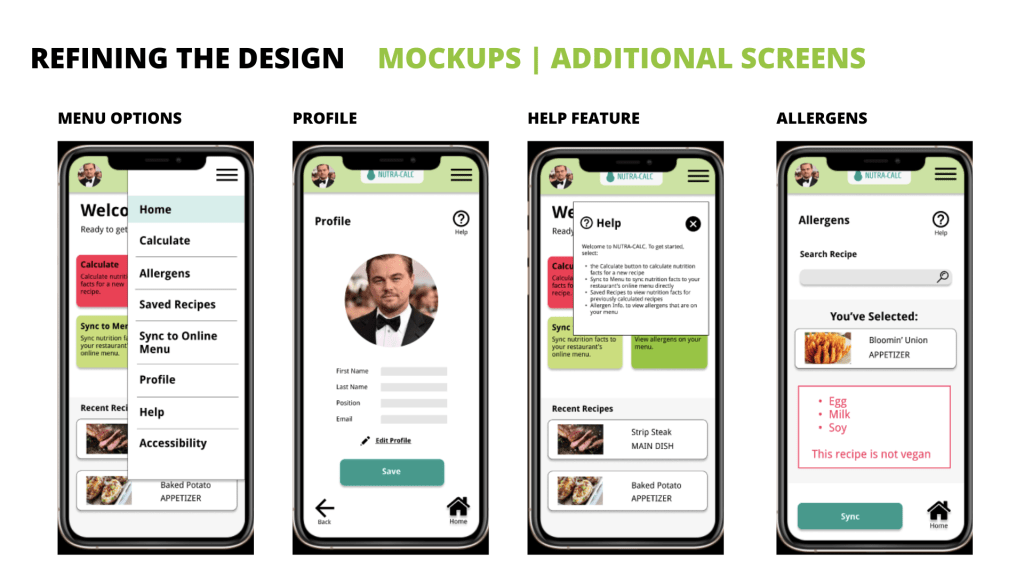
REFINING THE DESIGN
- MOCKUPS
- HIGH-FIDELITY PROTOTYPES
- ACCESSIBILITY

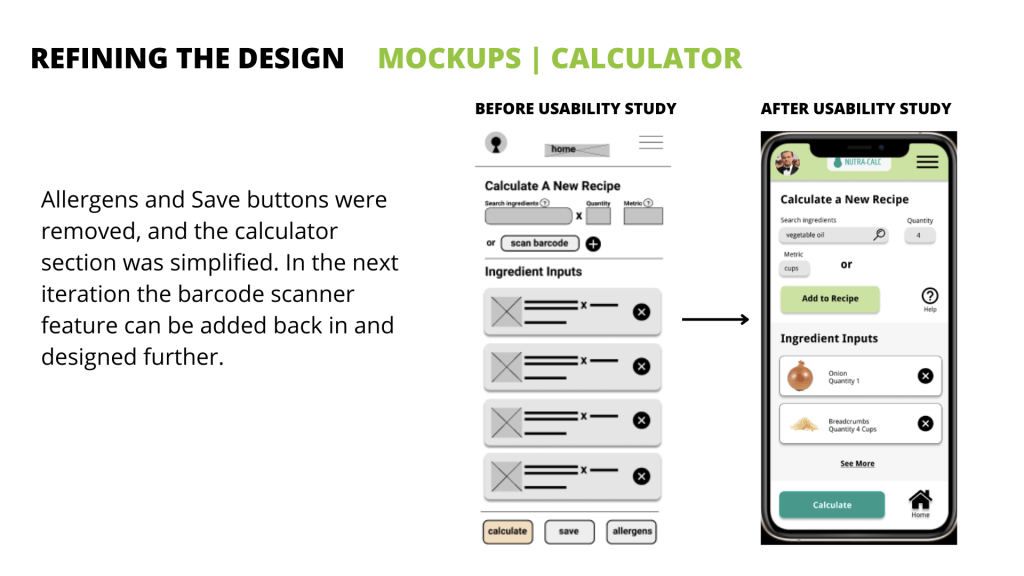

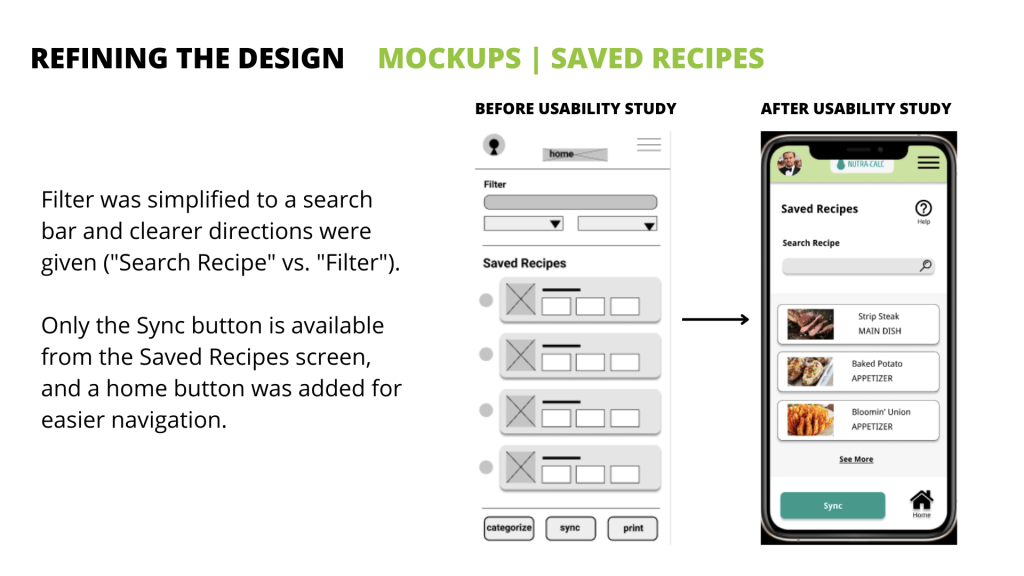

HIGH-FIDELITY PROTOTYPES

ACCESSIBILITY CONSIDERATIONS
- Color Contrast: Text and buttons used appropriate color contrast so users with visual impairments/color blindness would be able to view information on the screen and navigate the app.
- Accessibility Customization Options From Main Menu: Users could select “Accessibility” from the main menu to access settings to customize the app to their specific needs.
- Help Buttons: Users are able to get help on any screen in the app by selecting the help icons, or by selecting “Help” from the main menu.
GOING FORWARD
- TAKEAWAYS
- NEXT STEPS
TAKEAWAYS – IMPACT
This app was never developed so I do not have conversion information, but users interviewed did feel that the final design saved them time.
“Looking up each ingredient individually would’ve been a pain.” ~ Participant C
“The nutrition info. i easy, it’s way easier than searching for everything individually.” ~ Participant D
WHAT I LEARNED
This was my first UX design and research project, so I learned quite a bit about the process for both. My background is in marketing, and it was difficult to conduct research solely on usability and not try to gather information on marketability/product viability in the marketplace. Overall, I learned that simpler is better and that UX design takes a lot of patience – I should expect to iterate on my designs multiple times based on feedback.
NEXT STEPS
- Build out the scalability feature:
- Automatically updating nutrition information based on portion size would be helpful for chefs when changing from lunch to dinner portions, or to kids meal sizes.
- Add a barcode scanner feature to the calculator screen:
- This would make it easy for users to scan an ingredient’s bar code to add the nutrition info. to the recipe easily. Many calorie tracking apps for consumers have this feature already.
- Create additional accessibility features:
- This app could definitely be improved from an accessibility standpoint. Including features like light / dark mode, text enlargement, and ensuring its VoiceOver/screen reader compatible could greatly improve the experience for a variety of users.
If you liked this case study, get in touch with me! Or, view the rest of my portfolio.
Thanks for viewing!
💰🌱 You might enjoy this related case study: MoneyTree: Designing a Flow to Set Up a Personal Bank Account
 Kathleen Hagelberger